
What Is Matter? The Complete Beginner’s Guide
TL;DR
- ✅ What is Matter? It is a standard enabling certified devices from different brands to operate across major smart home ecosystems.
- ✅ The Matter smart home protocol runs over Wi-Fi, Thread, and Ethernet instead of replacing these network technologies.
- ✅ How Matter works combines local communication, Multi-Admin control, secure commissioning, and standardized device models.
- ✅ Matter compatibility now covers lighting, locks, appliances, cameras, energy systems, EV charging, and other categories.
- ✅ This Matter beginner guide explains how to select controllers, certified devices, network methods, and practical automation scenarios.
Why Was Matter Created?
If you’ve ever tried building a smart home, you’ve probably experienced this frustration:
One smart light only works with its own app, a smart lock requires a completely different ecosystem, and a security camera insists on yet another platform. Before long, your phone is filled with multiple smart home apps, while devices from different brands still refuse to work together. This lack of interoperability has frustrated countless consumers, slowed the adoption of smart homes, and ultimately limited the industry’s growth.
This frastration became one of the biggest barriers to smart home adoption.
The Smart Home Industry Was Too Fragmented
Before Matter, every major technology company was building its own ecosystem.
Apple promoted HomeKit, Google developed Google Home, Amazon expanded Alexa, while brands such as Samsung, Tuya, and countless manufacturers created their own platforms and communication methods.
The result was a market where Matter compatibility was often more important than product quality.
Consumers frequently had to ask questions like:
- Does this smart lock work with Apple Home?
- Is this light compatible with Alexa?
- Can this sensor connect to Google Home?
- Will these devices still work if I change ecosystems in the future?
Choosing the wrong ecosystem could mean replacing perfectly functional devices simply because they could not communicate with one another.
Why the World’s Largest Technology Companies Worked Together
Instead of creating another competing ecosystem, the industry’s largest companies decided to collaborate.
Under the Connectivity Standards Alliance (CSA), companies including Apple, Google, Amazon, Samsung, IKEA, Schneider Electric, Signify (Philips Hue), Tuya, and hundreds of other manufacturers joined forces to develop a common open standard.
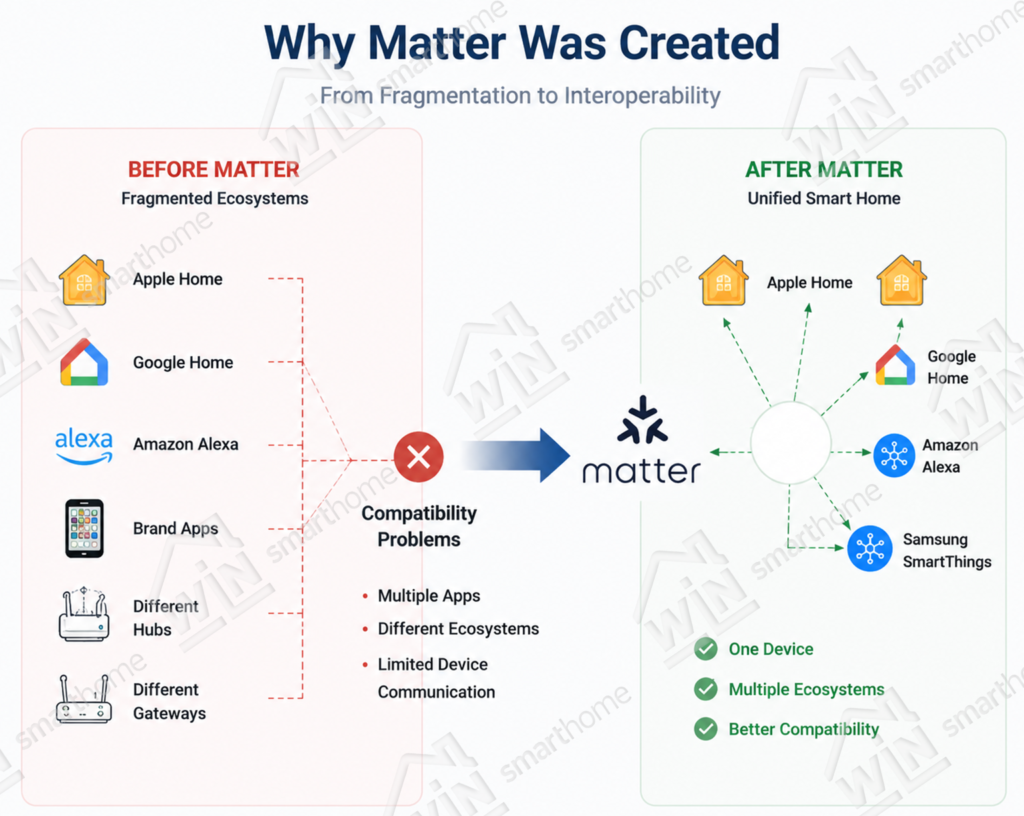
This was an important shift.
Rather than asking consumers to choose one ecosystem over another, the goal became enabling devices to work across multiple ecosystems through a shared Matter smart home protocol.
- For homeowners, this means greaater flexibility.
- For manufacturers, it reduces the need to develop and maintain separate integrations for every major platform.
- For the industry, it creates a larger and healthier smart home ecosystem.
What Is Matter?
Matter Is the “Translator” of Smart Homes
Matter is not a wireless communication protocol. Instead, it is an application-layer interoperability standard that allows smart devices from different manufacturers to communicate using the same language.
A simple way to understand Matter is to think about USB-C.
USB-C did not replace electricity or invent a new charging technology—it standardized how different devices connect. Matter follows a similar idea for smart homes. It does not replace Wi-Fi, Thread, or Ethernet. Instead, it provides a common application layer that enables devices from different brands to work together seamlessly.
For example, a Matter-certified smart sensor can be added to Apple Home, Google Home, Amazon Alexa, or Samsung SmartThings without requiring different versions of the same product. This interoperability is one of Matter’s biggest advantages and is made possible through features such as Multi-Admin, which allows a single Matter device to be managed by multiple ecosystems simultaneously.
In short:
Matter does not define how devices transmit data—it acts as the “translator” that enables different communication technologies and smart home ecosystems to understand one another.
Matter’s Layered Architecture
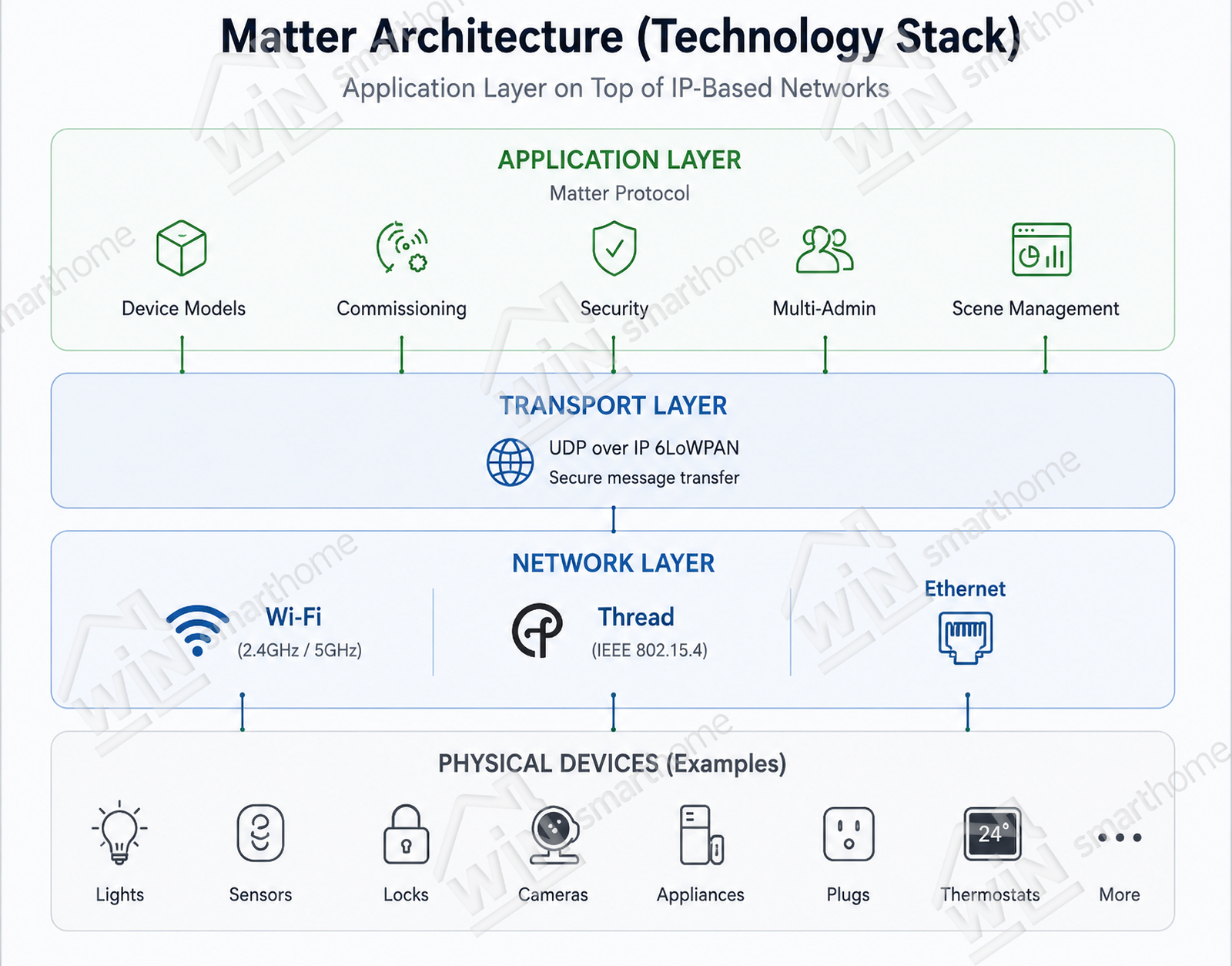
In reality, Matter is an application-layer protocol. It does not define how data is physically transmitted. Instead, it runs on top of existing IP-based network infrastructure, allowing manufacturers to leverage mature communication technologies while providing a unified smart home experience.
This layered architecture enables Matter to combine the strengths of different network technologies. Devices that require high bandwidth, such as smart cameras and home appliances, can communicate over Wi-Fi, while battery-powered products like sensors, switches, and smart locks benefit from the ultra-low power consumption of Thread. For devices requiring maximum reliability, Matter also supports Ethernet.
The Matter technology stack can be summarized as follows:
| Layer | Technology |
|---|---|
| Application Layer | Matter Protocol (Device Models, Commissioning, Security, Multi-Admin, Scene Management) |
| Transport Layer | TCP / UDP over IPv6 |
| Network Layer | Wi-Fi (2.4GHz / 5GHz), Thread (IEEE 802.15.4), Ethernet |
Rather than replacing Wi-Fi, Thread, or Ethernet, Matter acts as the common language that allows devices using different network technologies to communicate seamlessly within the same smart home ecosystem.
Matter Over Wi-Fi, Thread, and Ethernet
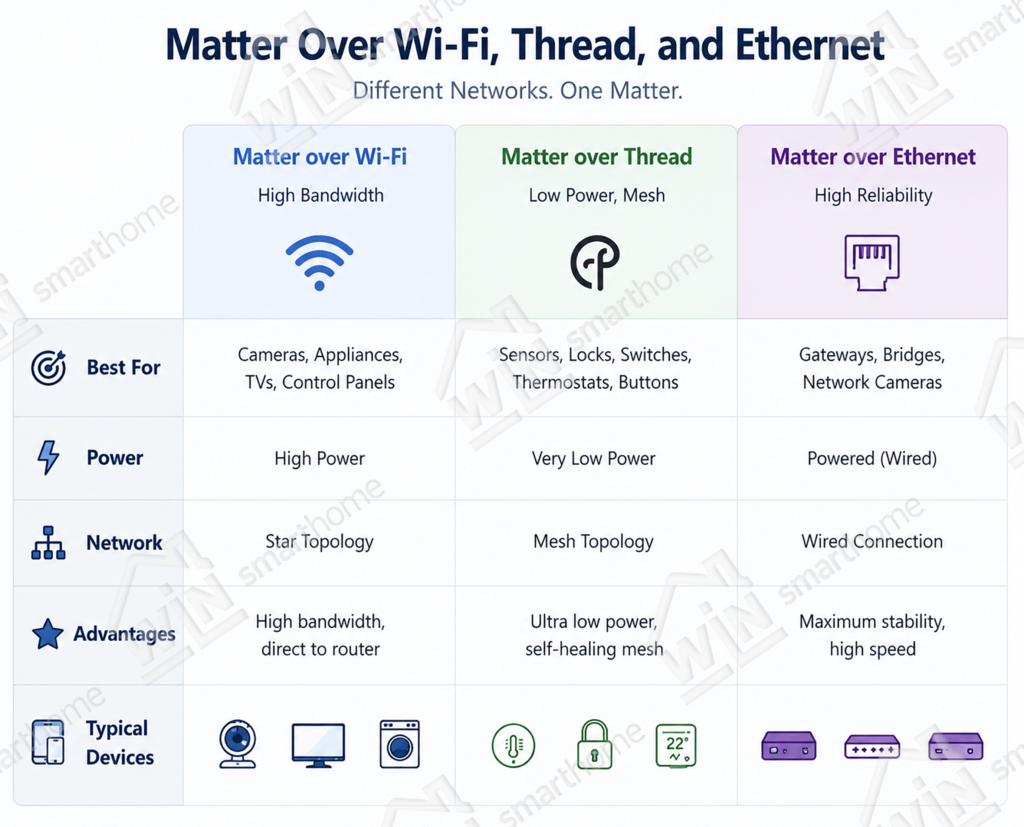
Matter can operate over multiple network technologies, each optimized for different applications.
| Connection Type | Typical Devices | Advantages |
|---|---|---|
| Matter over Wi-Fi | Cameras, smart appliances, smart TVs, control panels | High bandwidth, direct connection to Wi-Fi routers |
| Matter over Thread | Sensors, smart locks, switches, thermostats, buttons | Ultra-low power consumption, reliable mesh networking, ideal for battery-powered devices |
| Matter over Ethernet | Gateways, bridges, network cameras | Maximum stability and high-speed wired communication |
Rather than competing with one another, these connection methods complement different smart home scenarios.
Matter Supports More Than Just Smart Lights
Growth of Certified Matter Devices
| Time | Certified Devices | Growth Highlights |
|---|---|---|
| End of 2022 | ~200 | Matter 1.0 officially released, first batch of certified devices |
| End of 2023 | ~1,500 | Rapid growth phase, major brands began adopting Matter |
| End of 2024 | ~3,500 | Doubled within one year, major home appliances joined the ecosystem |
| Mid-2025 | ~4,000 | Matter 1.4 drove certification of new device categories |
| End of 2025 | 6,500+ | Matter 1.5 released, significant growth driven by new categories such as cameras |
| Q1 2026 | 7,100+ | More than 600 new certified devices added in a single quarter (record high) |
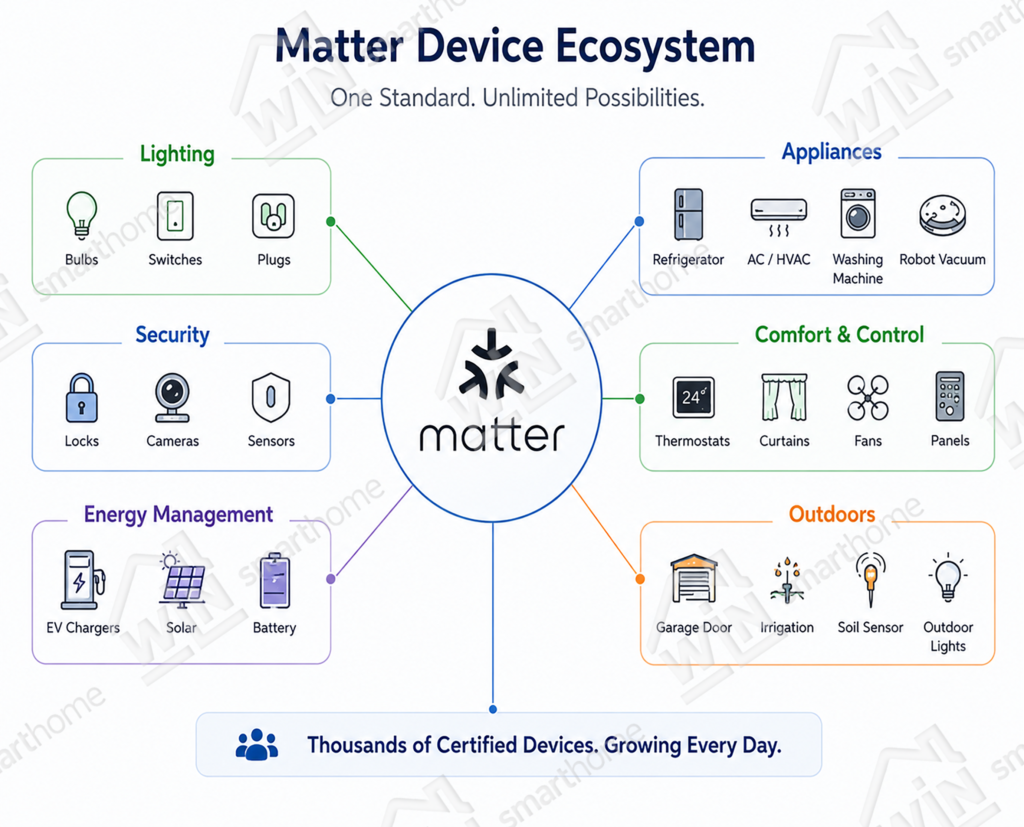
Matter has expanded rapidly since its launch in 2022. Today, it supports far more than traditional smart lighting products.
Supported Device Categories (21 Categories)
| No. | Device Category | Matter Version | Typical Products |
|---|---|---|---|
| 1 | Lighting & Electrical Devices | 1.0 | Smart bulbs, light strips, switches, outlets, dimmers |
| 2 | Multi-Purpose Control Devices | 1.0 | Wireless switches, scene buttons, smart knobs |
| 3 | Bridges | 1.0 | Zigbee-to-Matter bridges, Hue Bridge |
| 4 | Door Entry & Access Control | 1.0 | Smart door locks (fingerprint, keypad, Home Key) |
| 5 | Curtains & Window Coverings | 1.0 | Motorized curtain motors, blind controllers |
| 6 | Safety & Security | 1.0 | Smoke detectors, CO detectors, water leak sensors |
| 7 | Thermostats | 1.0 | Smart thermostats, underfloor heating controllers |
| 8 | Televisions | 1.0 | Smart TV power and control |
| 9 | Refrigerators | 1.2 | Temperature adjustment, mode switching |
| 10 | Air Conditioners | 1.2 | Temperature, fan speed, and mode control |
| 11 | Dishwashers | 1.2 | Start, pause, and status monitoring |
| 12 | Washing Machines & Dryers | 1.2 | Program selection and status notifications |
| 13 | Robot Vacuums | 1.2 | Start, return to dock, and cleaning modes |
| 14 | Air Purifiers | 1.2 | Fan speed, operating modes, and filter status |
| 15 | Fans | 1.2 | Fan speed, oscillation, and timer |
| 16 | Energy Management | 1.3 | Smart meters, solar inverters, battery storage systems |
| 17 | Water Management | 1.3 | Smart water valves, water leak detection |
| 18 | EV Charging | 1.3 | Charging status and start/stop control |
| 19 | Cameras | 1.5 | Live video streaming, two-way audio, PTZ control |
| 20 | Closures | 1.5 | Garage doors, gates, awnings |
| 21 | Soil Sensors | 1.5 | Soil moisture and temperature monitoring, irrigation automation |
As the Matter ecosystem continues to grow, it is evolving from a protocol for individual smart devices into a comprehensive interoperability standard for the entire connected home.
Practical Guide: How to Build a Matter Smart Home
Setting up a Matter smart home is much simpler than many people expect. In most cases, the process can be completed in five straightforward steps, from choosing a Matter controller to creating your first automation.
The overall setup process is as follows:
1. Choose a Matter Controller
2. Choose Matter-Certified Devices
3. Add Devices to Your Matter Network
4. Create Smart Automation
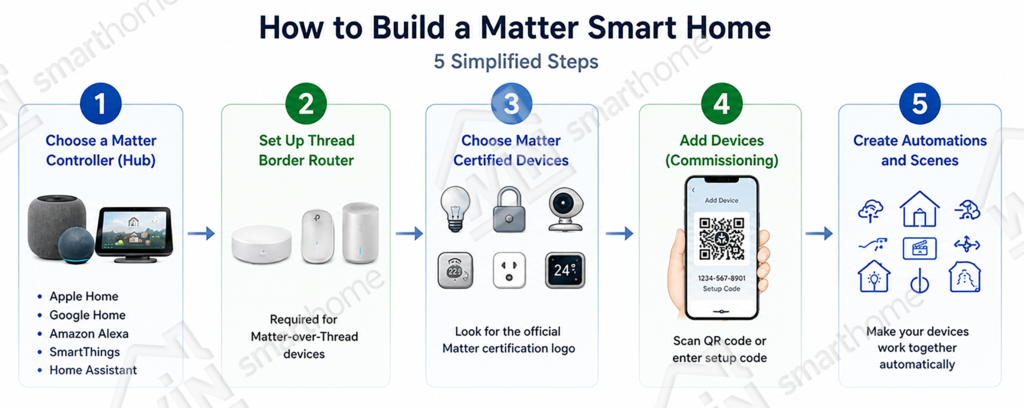
Step 1: Choose a Matter Hub
A Matter Hub acts as the “brain” of your smart home. It is responsible for commissioning devices, managing their status, and executing automation rules. Different controllers also provide different ecosystem experiences.
| Matter Controller | Main Advantages | Best For |
|---|---|---|
| Apple HomePod mini | Built-in Thread Border Router, excellent Apple ecosystem integration | iPhone and iPad users |
| Apple TV 4K | Thread support, Ethernet connectivity, HomeKit Secure Video | Apple home hubs |
| Google Nest Hub (2nd Gen) | Google ecosystem integration with smart display | Android users |
| Samsung SmartThings Hub | Broad multi-brand compatibility | Mixed-brand smart homes |
| Home Assistant | Fully local control, maximum flexibility | Advanced users and enthusiasts |
Choose the controller that best matches the ecosystem you already use. Matter supports Multi-Admin, so compatible devices can later be shared across multiple ecosystems if needed.
Step 2: Choose Matter-Certified Devices
When selecting devices, there are 3 key principles to remember.
- Look for the official Matter certification logo. This confirms that the product has passed CSA certification.
- Choose the appropriate connection method. Matter-over-Wi-Fi is ideal for continuously powered devices such as cameras and appliances, while Matter-over-Thread is better suited for battery-powered devices because of its low power consumption.
Step 3: Add Devices to Your Matter Network
Commissioning a Matter device typically takes only a few minutes.
- Open your preferred Matter controller app, such as Apple Home, Google Home, Samsung SmartThings, or Home Assistant.
- Select Add Device and scan the Matter QR code on the product packaging, or enter the setup code manually.
- Wait for the device to join the Matter network, then assign it a name and room.
For the best local experience, configure devices directly through your Matter controller rather than relying only on the manufacturer’s cloud app whenever possible.
Step 4: Create Smart Automation
Once your devices are connected, you can begin creating automation that makes your home work intelligently. The following are some of the most common automation scenarios.
| Scene | Trigger | Action |
|---|---|---|
| Home Mode | Smart lock detects a family member or GPS arrival | Turn on entrance lights, open curtains, start the air conditioner, and play background music |
| Away Mode | One tap or the last person locks the door | Turn off lights, air conditioning, close curtains, arm the security system, and switch off unnecessary outlets |
| Sleep Mode | Long press a bedside switch or scheduled time | Gradually dim bedroom lights, close curtains, set the thermostat, and turn on a night light |
| Movie Mode | TV turns on or a one-touch scene | Dim living room lights, close curtains, turn on ambient lighting, and switch off unnecessary lights |
| Good Morning Mode | Scheduled time or phone alarm dismissed | Open curtains gradually, brighten lights, preheat the coffee machine, and announce the weather |
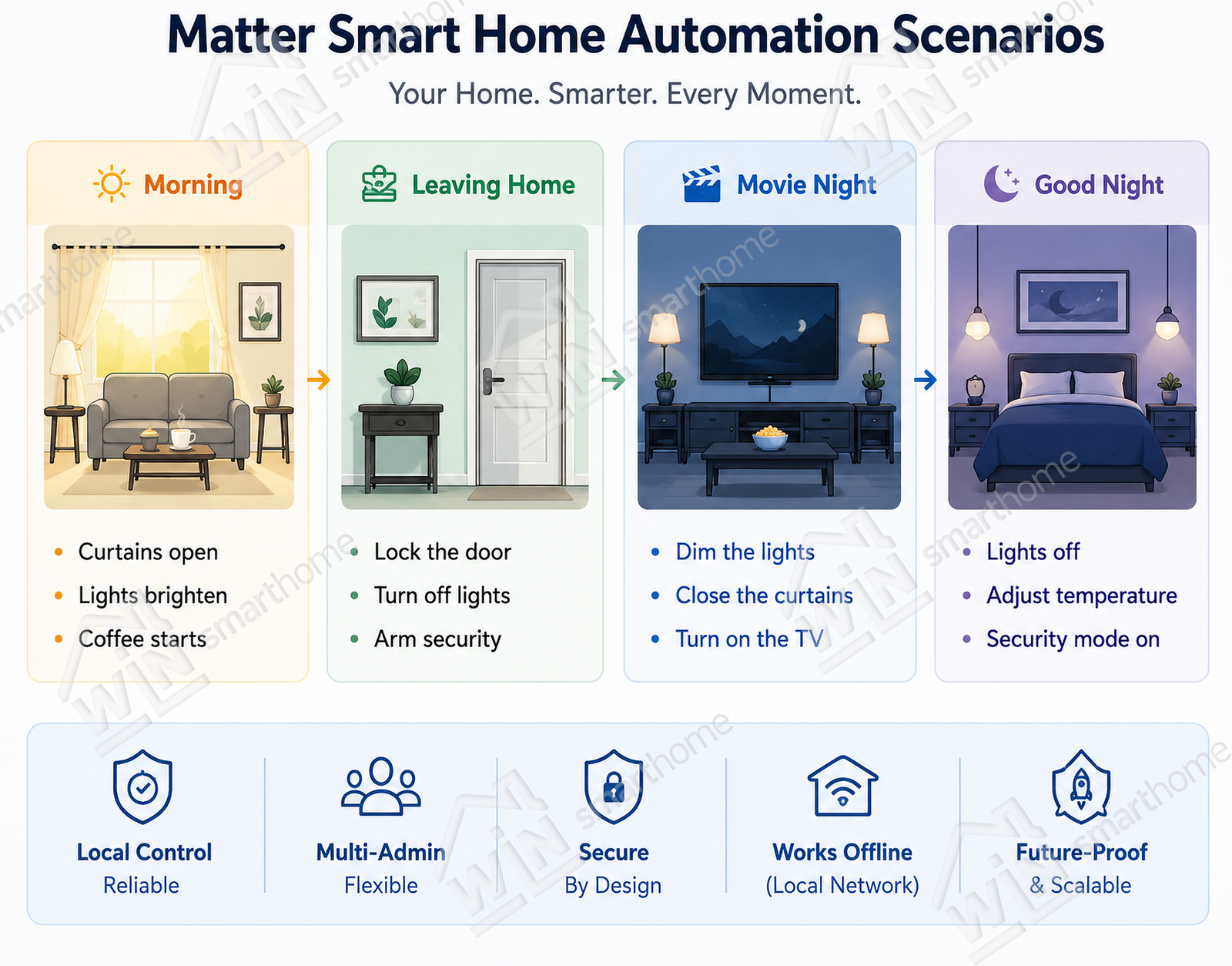
With Matter, building a smart home is no longer about choosing a single brand.
It is about creating an open, interoperable ecosystem that can grow with your needs while keeping setup and daily management simple.
Frequently Asked Questions
Q1: Can Matter control non-Matter devices?
Not directly. However, non-Matter devices can be integrated into a Matter ecosystem through a Matter Bridge. For example, Zigbee or Bluetooth Mesh devices connected to a compatible bridge can be exposed as Matter devices and controlled by Matter controllers such as Apple Home, Google Home, or Samsung SmartThings. Keep in mind that some advanced device features may not be available after bridging.
Q2: Is Matter the same as Thread?
No. Matter and Thread are different technologies that work together.
Thread is a low-power wireless mesh networking protocol responsible for transporting data between devices. Matter is an application-layer standard that defines how devices communicate regardless of the underlying network. In many smart homes, Matter runs over Thread for battery-powered devices and over Wi-Fi or Ethernet for high-bandwidth devices.
Q3: Can Zigbee devices work with Matter?
Yes—but usually through a Matter Bridge rather than natively.
Many existing Zigbee ecosystems, including Philips Hue, Aqara, and other compatible hubs, can expose their Zigbee devices to Matter controllers. This allows users to manage legacy Zigbee products within Matter ecosystems while protecting existing investments. However, depending on the bridge implementation, some device-specific features may not be fully supported.
Q4: Do Matter devices work without the Internet?
Yes. This is one of Matter’s biggest advantages.
Matter devices communicate over your local network, so automation, device control, and communication between Matter devices continue to work even if your Internet connection is unavailable, as long as your local network remains operational.
Cloud-based features such as remote access, firmware updates, and cloud synchronization still require an Internet connection.
Q5: How can I identify a genuine Matter product?
Look for the official Matter certification logo on the product packaging.
You can also verify whether a product has been officially certified by searching its model name in the Connectivity Standards Alliance (CSA) certification database.
Planning a Smart Hotel, Villa, or Smart Building Project?
WinSmartHome supports developers, distributors, hotel automation companies, and system integrators with:
- KNX smart home product sourcing
- Matter-compatible smart home products
- Smart hotel and villa automation planning
- HVAC control and thermostat selection
- Lighting control and dimming solutions
- Multi-protocol system integration
- OEM / ODM smart home product support
Request Technical Consultation